Best cable management for desk: top picks on Amazon

Cable management approach, capacity, mounting method and whether the solution is reversible or permanent determine which cable management system suits a home office desk setup.

By Pickspry EditorialUpdated 4 picks


The short answer

Velcro Cable Ties 100-Pack at $10 is the best starting point for desk cable management: reusable velcro straps bundle and separate cables without cable damage, the 100-count provides enough for a full desk setup and the approach works whether cables are routed on the desk surface, along the wall or under the desk.

Product buttons open Amazon search results. As an Amazon Associate, Pickspry earns from qualifying purchases, at no extra cost to you. Learn more

Quick picks

How we chose

Cable management products are evaluated by cable capacity, mounting method, reversibility, surface compatibility, material and price. Specs from manufacturer product pages. We did not test these products.

The picks, in detail

4 picks reviewed
01
Best cable management for most desks
Velcro Brand Velcro Brand One-Wrap Cable Ties 100-Pack

Velcro Brand One-Wrap Cable Ties 100-Pack

Brand: Velcro Brand

Best for

Home office workers who want a flexible, reversible cable bundling solution that works with any cable routing approach, where Velcro one-wrap ties allow bundling multiple cables together and can be repositioned or removed without any tools or desk modification.

Skip if

Concealment rather than bundling is the primary goal. Velcro ties bundle cables into neater groups but do not hide them inside a box or channel. For complete concealment of power strips and adapter blocks, a cable management box like Bluelounge CableBox is the appropriate solution.

Velcro One-Wrap cable ties use a hook-and-loop material that sticks to itself rather than requiring a separate buckle or clip. Each tie wraps around a cable bundle and the tail loops back to the velcro surface on the other side, securing the bundle without the permanent commitment of zip ties.

The reusable design allows adding or removing cables from a bundle without cutting. Velcro ties do not damage cable insulation the way over-tightened zip ties can when cinched hard.

At $10 for 100 ties, Velcro One-Wrap is $0.10 per tie, appropriate for a comprehensive bundling approach across a full desk setup.

Specifications

Specifications for Velcro Brand One-Wrap Cable Ties 100-Pack
MaterialVelcro (hook and loop)
Quantity100 ties
ReusableYes
Width0.5 inch wide x 8 inch long
Price$10

Specs from Velcro cable ties, reusable cable management Amazon search

02
Best cable concealment box for power strips
Bluelounge Bluelounge CableBox Mini

Bluelounge CableBox Mini

Brand: Bluelounge

Best for

Users who want to completely conceal a power strip and its attached cable mess inside a box, where Bluelounge CableBox uses a hinged lid enclosure sized to fit most power strips with enough interior volume for the power adapter blocks that typically pile up around a surge protector.

Skip if

Wall or under-desk mounting is preferred. Bluelounge CableBox sits on the floor or desk surface rather than mounting to a wall or the underside of the desk. For under-desk cable concealment, the IKEA Signum cable rack or a J channel raceway provides a mounted solution.

Bluelounge CableBox Mini uses a rectangular ABS plastic box with openings on each end for cables to exit. The power strip sits inside the box with its power cord exiting one end and device cables exiting the other. The hinged lid allows accessing the power strip outlets to add or remove plugs.

The interior volume accommodates standard power adapter blocks attached to the strip's outlets. The box is available in white and black to match desk surfaces.

At $30, Bluelounge CableBox is the highest-cost solution in this guide for a single power strip concealment unit.

Specifications

Specifications for Bluelounge CableBox Mini
MaterialABS plastic
Interior dimensions9.5 x 3.5 x 3.1 inches
Power strip capacityPower strips up to 7 outlets
LidHinged, removable
Price$30

Specs from Bluelounge CableBox Mini, cable concealment box Amazon search

03
Best under-desk cable channel
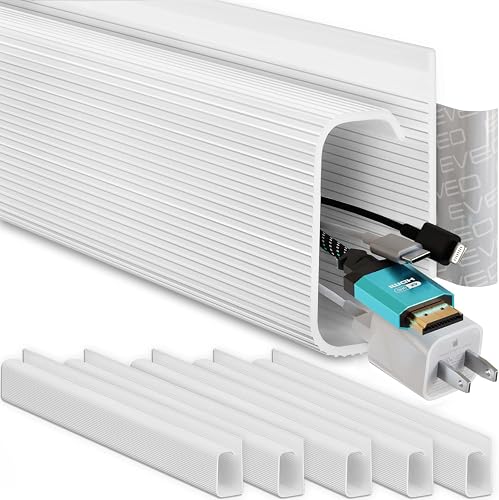
SimpleCord J Channel Cable Raceway 6-Pack

J Channel Cable Raceway 6-Pack

Brand: SimpleCord

Best for

Users who want to route cables along a wall, baseboard or the underside of a desk in a plastic channel that conceals the cables while keeping them accessible, where J channel raceway uses self-adhesive strips to mount along any flat surface and a snap-on cover that hides cables inside.

Skip if

Reversibility is important. J channel raceway uses adhesive mounting that can leave residue or surface marks on painted walls and desk undersides. For rental apartments or situations where wall modification is not acceptable, velcro ties with cable clips are a better reversible approach.

J channel cable raceway uses a U-shaped plastic channel that mounts against a wall or surface. Cables lay inside the channel and a snap-on cover closes over them. The channels join end-to-end to run a longer continuous route.

The six-piece pack provides approximately 90 inches of cable routing, enough to run cables from a desk top down to the floor and along the baseboard to an outlet. The white PVC blends with most painted walls.

At $15 for 6 pieces, J channel raceway is the most cost-effective concealment solution for routing cables from the desk to the wall outlet.

Specifications

Specifications for J Channel Cable Raceway 6-Pack
MaterialPVC plastic
Pack size6 pieces (each piece approximately 15 inches long)
MountingSelf-adhesive (included)
Cable capacityApproximately 3 to 5 standard cables per channel
Price$15

Specs from J channel cable raceway, cable management channel Amazon search

04
Best under-desk cable management shelf
IKEA IKEA Signum Cable Management Unit

IKEA Signum Cable Management Unit

Brand: IKEA

Best for

Users who want to mount a power strip and cable bundle under the desk surface using a metal wire tray, where IKEA Signum mounts horizontally under the desk with screws and holds a power strip and cable collection off the floor and out of sight.

Skip if

A tool-free or adhesive mounting solution is needed. IKEA Signum requires drilling pilot holes and screwing the mounting bracket into the underside of the desk. For desks where drilling is not acceptable (glass-top desks, rental furniture), a cable management box that sits on the floor is a non-invasive alternative.

IKEA Signum uses a steel wire tray that mounts underneath the desk with two screw-mounted brackets. The tray holds a power strip, cable bundles and power adapters suspended under the desk surface, removing them from the floor and keeping the desk area clean.

The open wire design allows airflow around power adapters and prevents heat buildup that occurs in fully enclosed cable boxes. The 47cm length accommodates most 6-outlet power strips with room for adapter blocks.

At $20, IKEA Signum provides a permanent, high-capacity under-desk cable management solution at an accessible price.

Specifications

Specifications for IKEA Signum Cable Management Unit
MaterialSteel wire
MountingScrew-mount (under-desk)
Dimensions47 x 12 cm (approximately 18.5 x 4.7 inches)
Load capacity5 kg (approximately 11 lb)
Price$20

Specs from IKEA Signum cable management, under desk cable tray Amazon search

Cable management comparison

Model Type Reversible Capacity Price
Velcro ties 100-pack Bundling Yes Any cable $10
Bluelounge CableBox Concealment box Yes (surface-sitting) 1 power strip $30
J Channel raceway Wall/desk channel No (adhesive) 3-5 cables $15
IKEA Signum Under-desk tray No (screw mount) 1 power strip + cables $20

Compare the picks

Side by side comparison of every pick
Specification
Velcro Brand Velcro Brand One-Wrap Cable Ties 100-Pack
Velcro Brand One-Wrap Cable Ties 100-Pack
Bluelounge Bluelounge CableBox Mini
Bluelounge CableBox Mini
SimpleCord J Channel Cable Raceway 6-Pack
J Channel Cable Raceway 6-Pack
IKEA IKEA Signum Cable Management Unit
IKEA Signum Cable Management Unit
Our verdictBest cable management for most desksBest cable concealment box for power stripsBest under-desk cable channelBest under-desk cable management shelf
MaterialVelcro (hook and loop)ABS plasticPVC plasticSteel wire
Quantity100 tiesNot listedNot listedNot listed
ReusableYesNot listedNot listedNot listed
Width0.5 inch wide x 8 inch longNot listedNot listedNot listed
Price$10$30$15$20
Interior dimensionsNot listed9.5 x 3.5 x 3.1 inchesNot listedNot listed
Power strip capacityNot listedPower strips up to 7 outletsNot listedNot listed
LidNot listedHinged, removableNot listedNot listed
Pack sizeNot listedNot listed6 pieces (each piece approximately 15 inches long)Not listed
MountingNot listedNot listedSelf-adhesive (included)Screw-mount (under-desk)
Cable capacityNot listedNot listedApproximately 3 to 5 standard cables per channelNot listed
DimensionsNot listedNot listedNot listed47 x 12 cm (approximately 18.5 x 4.7 inches)
Load capacityNot listedNot listedNot listed5 kg (approximately 11 lb)
BuyCheck priceCheck priceCheck priceCheck price

Questions people ask

What is the best way to manage desk cables?

Effective desk cable management uses a layered approach. Layer 1 (bundling): use velcro ties to bundle cables that run together along the same path into a single bundle rather than individual strands. Bundled cables are easier to route and move as a single unit. Layer 2 (routing): route cable bundles along the back edge of the desk or the underside using cable clips, adhesive cable anchors or a J channel raceway to keep cables off the desk surface and floor. Layer 3 (concealment): use a cable management box or under-desk tray to hide the power strip and adapter mass. The combination of bundling, routing and concealment eliminates most visible cable clutter without removing a single device.

How do I label cables so I know which one is which?

Cable labeling prevents the common problem of unplugging the wrong device when troubleshooting or rearranging a desk. Three approaches: label tape with a label maker creates durable, adhesive labels that wrap around cables close to the connector or plug end. Bread bag ties (plastic strips with a metal core) wrap around the cable and the label end can be written on with a marker. Silicone cable tag sets include small rubber tags with cut openings that slip onto a cable and include a writable surface or numbered sequence. Label cables at both the device end (where it connects to the computer) and the plug end (where it connects to the power strip) so the cable can be identified from either end when following the bundle.

Can I put a power strip in a cable management box?

A power strip can be placed in a cable management box designed for this purpose (like Bluelounge CableBox) with appropriate precautions. The box must have ventilation openings for the heat that power adapters generate. The CableBox has openings on both ends for cables to enter and exit; this provides adequate ventilation for typical home office loads. Do not use a fully sealed container (a plastic bin, a drawer) to store a power strip with high-wattage devices plugged in. High-wattage devices (space heaters, high-end monitors, gaming desktops) generate enough heat that a fully enclosed power strip can overheat. For normal office loads (laptop chargers, monitors, phone chargers, desk lamps), a ventilated cable management box is safe.

  • Buying guide

    Best monitor stand for desk: top picks on Amazon

    Monitor stand height, material, weight capacity, storage underneath and whether the stand adjusts for different monitor sizes determine which stand suits a home office setup.

    4 picks · 5 sourcesUpdated September 28, 2026

  • Buying guide

    Best desk mat for home office: top picks on Amazon

    Desk mat size, material, surface texture, thickness and whether it provides mouse tracking and wrist support determine which desk mat suits a home office workstation.

    4 picks · 5 sourcesUpdated September 28, 2026

  • Buying guide

    Best desk lamp for home office: top picks on Amazon

    Desk lamp brightness in lumens, color temperature range, dimming capability, arm adjustability, USB charging ports and whether the lamp uses replaceable or integrated LED bulbs determine which lamp suits a home office or study desk.

    4 picks · 5 sourcesUpdated September 28, 2026