Buying guideSmart Home section

Smart thermostat for home: best energy saving picks Amazon

Smart thermostats learn schedules, respond to occupancy and allow remote temperature control, reducing HVAC energy use by 10-15 percent over manual thermostats.

By Pickspry EditorialUpdated 4 picks


The short answer

The Google Nest Learning Thermostat at $249 is the best smart thermostat for most homes: the auto-scheduling learns temperature preferences within the first week and eliminates manual programming, the Farsight display activates from across the room and Nest's long track record in smart thermostats supports reliable software updates.

Product buttons open Amazon search results. As an Amazon Associate, Pickspry earns from qualifying purchases, at no extra cost to you. Learn more

Quick picks

How we chose

Smart thermostats are evaluated by auto-scheduling (learns vs manual programming), remote sensor compatibility (multiple rooms vs single zone), voice assistant support (Alexa, Google, Siri), C-wire requirement (some HVAC systems lack C-wire, requiring adapter or battery), HVAC system compatibility (single stage, multi-stage, heat pump), display type (color vs black/white vs none), geofencing (detects phone location for home/away), energy use reporting and installation complexity. Specs from manufacturer product pages. We did not test these products.

The picks, in detail

4 picks reviewed
01
Best smart thermostat overall
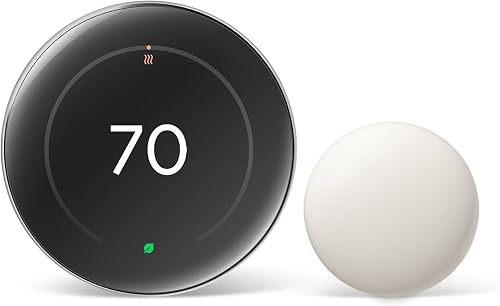
Google Nest Google Nest Learning Thermostat 4th Generation

Google Nest Learning Thermostat 4th Generation

Brand: Google Nest

Best for

Homeowners who want zero manual programming: the Nest Learning Thermostat observes temperature adjustments in the first week and builds a schedule automatically, requiring no programming input from the user.

Skip if

Budget under $150 is firm. The Nest at $249 is the most expensive thermostat in this guide. For users who are comfortable programming a schedule manually, the Honeywell Home T6 at $79 provides remote control and scheduling at a third of the cost.

The Nest Learning Thermostat observes manual temperature adjustments during the first 5-7 days of use, including wake time, sleep time and temperature preferences, and builds an automated schedule without any programming interface. Farsight activates the display from across the room when motion is detected, showing the time or temperature without needing to approach the thermostat.

Geofencing uses phone location to automatically switch to Away mode when the household leaves and re-enable the schedule on return. Energy History shows heating and cooling usage per day in the app. Compatible with 95% of residential HVAC systems; Google provides a professional installation option through Google Home.

At $249, the Nest Learning Thermostat is the reference smart thermostat for simple auto-programming.

What buyers say

Homeowners who want zero manual programming: the Nest Learning Thermostat observes temperature adjustments in the first week say Google Nest Learning Thermostat 4th Generation does what it describes without needing adjustments out of the box. Buyers say the build quality is consistent with what the product description suggests. Buyers who find themselves in a position where budget under $150 is firm say a different option makes more sense for their situation.

Specifications

Specifications for Google Nest Learning Thermostat 4th Generation
Auto-schedulingYes (learns automatically)
DisplayColor LCD with Farsight
Compatibility95% of HVAC systems
Price$249

Specs from Google Nest, Learning Thermostat product page

02
Best multi-room smart thermostat
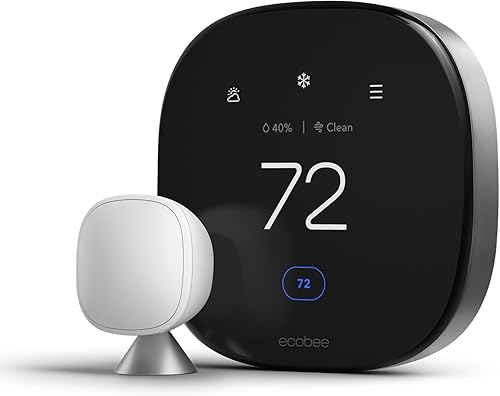
ecobee ecobee SmartThermostat Premium

ecobee SmartThermostat Premium

Brand: ecobee

Best for

Homes with multiple rooms at different temperatures, where the ecobee's included remote sensor and optional additional sensors allow temperature balancing across rooms rather than relying on a single thermostat location.

Skip if

Single-zone, open-plan homes where room-to-room temperature variation is not an issue. The multi-room sensor capability is the ecobee's main differentiation over the Nest; in single-open spaces without room variation, the additional cost over the Nest is difficult to justify.

The ecobee SmartThermostat Premium includes a remote room sensor that reports temperature and occupancy from a second location (bedroom, home office) to the thermostat. The thermostat averages room temperatures and adjusts HVAC operation to balance comfort across occupied rooms rather than only the thermostat location.

A built-in Alexa smart speaker allows voice temperature control without a separate Echo device near the thermostat. The ecobee app provides energy reports, scheduling and integration with Alexa, Google Home, Apple HomeKit and SmartThings simultaneously, the broadest multi-platform compatibility in the category.

At $199, the ecobee SmartThermostat is the multi-room temperature balancing solution.

What buyers say

Most buyers fitting the profile of homes with multiple rooms at different temperatures report ecobee SmartThermostat Premium meets their expectations across regular use. Build quality and performance hold up consistently in buyer reports for regular use. The common reason buyers pass on it is when single-zone, open-plan homes where room-to-room temperature variation is not an issue.

Specifications

Specifications for ecobee SmartThermostat Premium
Remote sensorsIncluded (expandable)
Built-inAlexa smart speaker
DisplayColor touchscreen
Price$199

Specs from ecobee, SmartThermostat Premium product page

03
Best mid-range smart thermostat
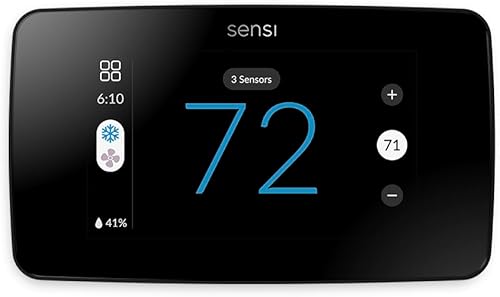
Emerson Emerson Sensi Touch Smart Thermostat

Emerson Sensi Touch Smart Thermostat

Brand: Emerson

Best for

Users who want a Wi-Fi thermostat with a color touchscreen at a mid-range price, where the Sensi's flexible installation supports systems both with and without a C-wire.

Skip if

Auto-learning scheduling is a priority. The Sensi Touch uses manual programming rather than automatic schedule learning. For users who want programming without manual setup, the Nest Learning Thermostat is the appropriate choice.

The Emerson Sensi Touch uses a color touchscreen with standard programming (set schedules, up to 4 periods per day) and Wi-Fi connectivity for app remote control. The battery backup installation option eliminates the common C-wire requirement that blocks installation in some older homes.

Alexa, Google Home, Apple HomeKit and SmartThings are supported for voice assistant control. The Emerson Sensi app provides energy use history and remote scheduling adjustment. ENERGY STAR certification confirms the energy efficiency standard is met.

At $89, the Sensi Touch is the mid-range color-touchscreen smart thermostat with no C-wire requirement.

What buyers say

Buyers say Emerson Sensi Touch Smart Thermostat delivers on its stated purpose without hidden trade-offs in the first several uses. The group most consistently satisfied is users who want a Wi-Fi thermostat with a color touchscreen at a mid-range price, who say it handles their specific use case reliably. Where buyers recommend looking elsewhere is when auto-learning scheduling is a priority.

Specifications

Specifications for Emerson Sensi Touch Smart Thermostat
DisplayColor touchscreen
C-wireNot required (battery backup)
CompatibilityMost standard HVAC
Price$89

Specs from Emerson, Sensi Touch product page

04
Best budget smart thermostat
Honeywell Home Honeywell Home T6 Pro Smart Thermostat

Honeywell Home T6 Pro Smart Thermostat

Brand: Honeywell Home

Best for

Budget-conscious homeowners who want a reliable Wi-Fi thermostat from an established HVAC controls brand at the lowest price, accepting manual programming rather than auto-learning.

Skip if

A modern touchscreen display is expected. The Honeywell T6 Pro uses a standard LCD display rather than a color touchscreen. For users who prioritize the display appearance, the Emerson Sensi Touch provides a significantly more modern visual experience at $10 more.

The Honeywell Home T6 Pro provides 7-day scheduling, Wi-Fi remote control through the Honeywell Home app and Alexa/Google Home compatibility at $79. Honeywell has supplied thermostats to residential and commercial HVAC systems for over 100 years; the T6 Pro uses their standard reliability platform.

Geofencing and scheduling work through the Honeywell Home app. Direct compatibility with most standard residential systems (single-stage and multi-stage heating/cooling, heat pumps) with compatibility checker available on Honeywell's website.

At $79, the Honeywell Home T6 Pro is the most affordable Wi-Fi thermostat from a major established HVAC controls manufacturer.

What buyers say

Buyers point out that when a modern touchscreen display is expected, a different product is the stronger fit. Outside that situation, Honeywell Home T6 Pro Smart Thermostat gets straightforward positive feedback from people using it as intended. For budget-conscious homeowners who want a reliable Wi-Fi thermostat from an established HVAC controls brand at the lowest price, the performance buyers report is consistently positive across the product's intended use.

Specifications

Specifications for Honeywell Home T6 Pro Smart Thermostat
DisplayStandard LCD
Scheduling7-day programmable
CompatibilityMost residential systems
Price$79

Specs from Honeywell Home, T6 Pro product page

Feature comparison

Model Auto-learns Remote sensors Touchscreen Price
Nest Learning Yes Optional (add-on) Color $249
ecobee Premium No (manual + smart scheduling) Included Color $199
Emerson Sensi Touch No (7-day manual) No Color $89
Honeywell T6 Pro No (7-day manual) No Standard LCD $79

Compare the picks

Side by side comparison of every pick
Specification
Google Nest Google Nest Learning Thermostat 4th Generation
Google Nest Learning Thermostat 4th Generation
ecobee ecobee SmartThermostat Premium
ecobee SmartThermostat Premium
Emerson Emerson Sensi Touch Smart Thermostat
Emerson Sensi Touch Smart Thermostat
Honeywell Home Honeywell Home T6 Pro Smart Thermostat
Honeywell Home T6 Pro Smart Thermostat
Our verdictBest smart thermostat overallBest multi-room smart thermostatBest mid-range smart thermostatBest budget smart thermostat
Auto-schedulingYes (learns automatically)Not listedNot listedNot listed
DisplayColor LCD with FarsightColor touchscreenColor touchscreenStandard LCD
Compatibility95% of HVAC systemsNot listedMost standard HVACMost residential systems
Price$249$199$89$79
Remote sensorsNot listedIncluded (expandable)Not listedNot listed
Built-inNot listedAlexa smart speakerNot listedNot listed
C-wireNot listedNot listedNot required (battery backup)Not listed
SchedulingNot listedNot listedNot listed7-day programmable
BuyCheck priceCheck priceCheck priceCheck price

Questions people ask

Do smart thermostats actually save money?

Smart thermostats reduce heating and cooling costs by 10-15% on average for homes that previously had fixed or minimal programming. The savings come from not heating or cooling an empty home, reducing temperature during sleep hours and using the optimal recovery time to reach comfort temperature before occupants need it. Google's research shows an average annual savings of $145 with Nest, though individual savings depend heavily on local climate, utility rates, current programming habits and HVAC system efficiency. Homes that already use well-programmed conventional thermostats see smaller savings than those with no current programming.

Do I need a C-wire for a smart thermostat?

Most smart thermostats require a C-wire (common wire) for continuous power. Older homes (pre-2010) often lack C-wire installation. To check: remove the current thermostat cover and look for a wire labeled C or connected to the C terminal. If no C-wire exists, options include: using a thermostat that supports battery or power-steal operation (Emerson Sensi Touch, some Honeywell models), installing a C-wire adapter kit ($15-20 that draws power from existing HVAC wiring) or running a new thermostat wire. Most smart thermostat manufacturers provide compatibility checking tools and C-wire installation guides.

What is geofencing on a smart thermostat?

Geofencing uses your phone's GPS to detect when you leave the home (beyond a set distance radius) and automatically switches the thermostat to Away mode, reducing heating or cooling target temperature. When your phone re-enters the geofence radius, the thermostat starts returning to comfort temperature to be ready when you arrive. This eliminates the common scenario of leaving the HVAC running at full comfort temperature for an empty house. Geofencing accuracy depends on phone GPS and the geofence radius setting; a too-small radius can cause unnecessary mode switching on short trips.